• Topic 2 - Exercise 1a

    Virtual Environments and Your Cognition

    Using Facebook

    I joined Facebook on 20th July 2009.


    Going to the Facebook site - www.facebook.com, filling in some basic details - Name, email address etc, I created a password and voila! I had a Facebook page. It was such an easy process to complete.  I found a couple of photos of myself to upload into my “profile photos”, filled in some personal info, such as the names of my husband and children and my page was definitely up and running.  Within a few hours I had requests from 4 people to become “friends”. It appears that being friends enables you to see the photos on another person’s Facebook page, write on their “wall” - a section of the page to leave messages etc and view their personal information.  24 hours later I had 7 friends that included family, past students and colleagues. I was intrigued to see the names that turned up with requests to be added. Read the rest of this entry »

  • Using Etherpad

    Using Etherpad 5/8/09

    Ken sent  a link to enter etherpad through my normal email address a few days before the meeting was scheduled to occur.

    Email:-

    Ken Eustace has shared an EtherPad document with you. 

    View it here and can we meet there again this WED 5 August at 11am or 7pm AEST?: 

    http://cyber.etherpad.com/1 

    Sent by cyber.etherpad.com at the request of an EtherPad user.

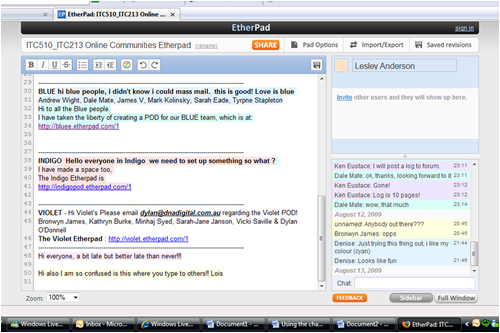
    It was a little confusing as when the link was clicked on it went through to a site and then the screen hung with a message in the middle of it that said waiting acceptance. After a while it came up as being denied.  The meeting was scheduled for 7.00pm on the 5th August so around that time I tried to log in again.  This time I went through to a screen that looked similar to this, although there were more people logged into the pad and their names were listed on the right hand side of the screen. 

    Etherpad Screenshot

    Etherpad Screenshot

    The left hand side of the screen is for collaborative document creation and on completion can be exported out of the website as html, text or pdf document. The right hand side of the screen is for chat purposes and is much like any other chat set-up.  I find these a little confusing when a large group is using them as you are unsure who questions are being addressed to etc and the chat can often move so quickly that conversation can be missed or lost.After using the pad for a while we were encouraged to create our own pad so that each POD colour group - the groupings that Ken had allocated before these sessions began - could have their own pad to possibly use for online collaboration on tasks. Read the rest of this entry »


  • Using Social Networks and Online Communities - some thoughts

    My Experiences with Online Communities - 1

    Well, this subject is all about Social Networking and Online Communities and I think I am actually beginning to catch on. I could say I am hooked. I have used MSN for years, ICQ as well and have found them great for keeping in touch with friends and their families but really not much more.

    I have also spent many hours(much to my husband’s dismay!) accessing , chat rooms, mailing lists, emailing etc. as I have followed a passion of mine - genealogy. Strange, though that, previously, I never really saw them as online communities or thought of them in terms of the “learning” they were providing. My list would be a couple of kms long, if I were to write down all the things I have learned from those online communities!!

    Even now, I see MSN, in a new light.  Read the rest of this entry »